Quick note: this awesome, free post contains one affiliate link which just means I’ll receive a small commission if you purchase from that link directly—but it’s at absolutely no cost to you! Legal disclaimer: this post was created for general informational purposes based on my own experiences. You are responsible for your own business decisions. Please check your state and local regulations for any legal rules you need to consider.
There are many different avenues to grow a newsletter list. I’ve captured six of them here. One of those ways I promised to expand on is hosting a viral giveaway using a platform like KingSumo.
What is a viral giveaway? It’s a marketing strategy meant to increase brand awareness and has a major opportunity to turn participants into fans. Of course, there’s the giveaway component, but entrants are also encouraged to share the contest and follow your social media accounts for more entries, increasing your visibility and their chance of winning.
What’s the difference between a social media giveaway and a “viral giveaway”? On a platform like Instagram, hosting a giveaway entails creating a post and then encouraging likes, comments and follows to increase reach, then selecting a winner at random. It’s hard to share off-app and the engagement is typically short-term, with people unfollowing once the entry period is over. A viral giveaway is hosted on a specific platform built for large-scale contests that run over an extended period of time and are good for sharing far and wide.
Why run a viral giveaway? For me, running a viral contest on KingSumo was an excellent way for me to engage with the community and grow my email list during that early stage when it’s hard to bring people in. Since the book I was promoting at the time was in the urban fantasy romance genre and had a lot of nostalgic touches, the giveaway was Twilight themed: Twilight lingo, Twilight background, Twilight prize bundle. By the end of it, my newsletter grew by almost 1,000 subscribers! That’s a lot of people that like Edward Cullen.
What made this giveaway so effective was:
- The marketing power I put behind it
- I took the time to really build out an experience
I apologize in advance if this post reads more like an auto repair manual than a blog, but there’s no easy way to make this type of author marketing sexy. It’s tedious, it’s steps-based, and it’s dry. But the goal here is not to woo you with my words, it’s to give you a straightforward guide on how you can create a viral giveaway that gets you hundreds of new subscribers.
Pick a Theme and a Prize
This is the fun part. You’ll want to pick a theme and curate a prize pack that aligns with your author brand. What genre do you write in? Horror, contemporary, thriller, romance, sci-fi, fantasy? The experience you create should emulate those vibes, meaning there should be an obvious connection between the theme of the giveaway and the stories you write.
Viral giveaways are great for tapping into fandoms because the people within those communities are passionate, engaged, and hungry for more of their favorite characters and worlds. In 2023 Amazon Ads conducted a study on fan culture and discovered over half of fans (55%) say they are more likely to consider a brand that sponsors content related to their fandom.
What are your book’s comps? Are there any big pre-existing fan bases you could tap into? For example, if your book is a YA dystopian with arena-style battles, The Hunger Games might be the perfect theme for your contest. Or, if your book is about a ragtag group of demon hunters, Supernatural might be a good one to use.
Once you’ve nailed down a concept for your contest, it’s time to assemble the prize pack. What do the readers or fans in the theme you’ve selected love? There’s a fine line between not breaking your bank account but still using products people will find worth signing up for. Here are some ideas:
- Box collections of popular series with alternate covers or bonus material
- Special editions or books with sprayed edges
- Themed candles, mugs, notebooks, bookmarks, tote bags
- Bookish stickers or stationary
It’s important to use products that are niche and unique but you must explicitly state that the giveaway is not affiliated, endorsed or sponsored by the brand that produced these items.
Setting Up The Giveaway
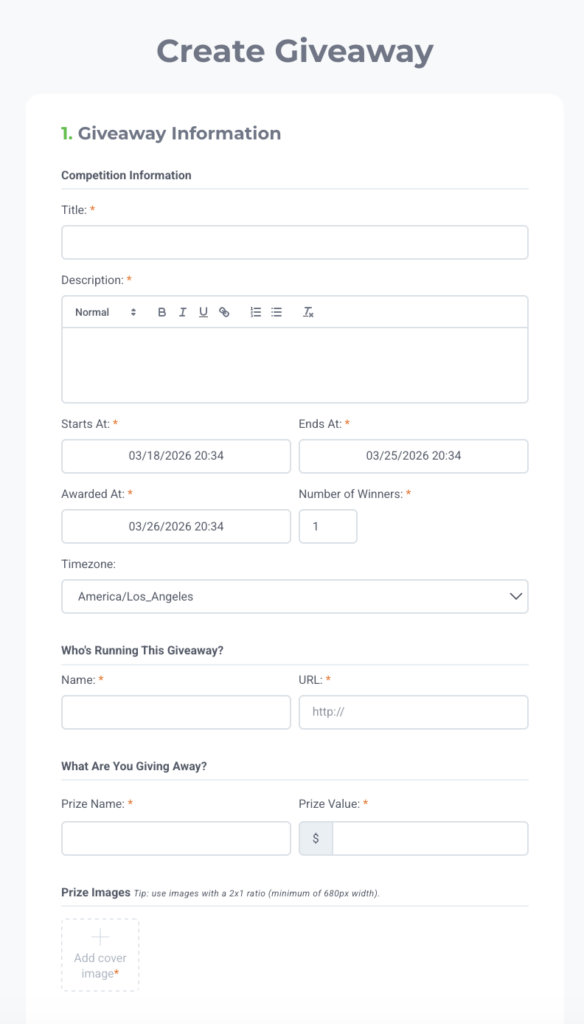
KingSumo is free, but there is an option to upgrade to the pro plan for $49 if custom branding, the ability to write your own terms and conditions, and third party integrations are important to you.
Setting up the contest itself is pretty intuitive. Once you create an account and select your plan you’ll fill out an online form with all the details: Title, Description, Start Date/Time, End Date/time, Bonus Entries, Rules/Terms, Prize Name/Value, etc.
Choose a title that’s short and sweet and relevant to your theme. This is what will be used for the URL. I.E. Romantasy Giveaway, Divergent Giveaway, etc.
Description
Let’s talk about the “description” section. This is where you get to dive deeper into what the contest is, who it’s for, and why you’re hosting it. Show off your personality but don’t skip any details so potential entrants aren’t confused and click away. Because we don’t gatekeep around here, here is the exact language I used for my Twilight giveaway.
Are you a twihard?
Enter to win this epic Twilight bundle:
- The Twilight Saga white box collection (Midnight Sun included!)
- Edward + Bella fleece throw blanket
- This is the Scent of a Killer, Bella soy candle
- Cullen Crest mug
What’s the story here?
Well first, hi! I’m Tory, an urban fantasy + paranormal romance author and I’m hosting this giveaway for a few reasons:
- I am diehard twihard (Team Edward!)
- I’m hoping if you love the Twilight Saga, you’ll like my books (the vibes are Twilight but with angels)
- It brings me joy to give back to my readers 🫶🏼
Things to know:
By entering your email address below, you’re also signing up for my newsletter, where I gush about Twilight but mostly talk about: my books and fictional characters, sneak peeks at character art + covers + secret projects I’m working on, exclusive updates on my writing + publishing, BuzzFeed-style quizzes, and more giveaways!
This giveaway is open to US residents only.
You can see I divided up the sections to clearly outline 1) who I was targeting, 2) why I was hosting the giveaway, and 3) the important details while still having a little bit of fun. Since these contests are focused on boosting your newsletter subscribers, it’s important to call out what people are agreeing to if they enter your contest.
Prize Images
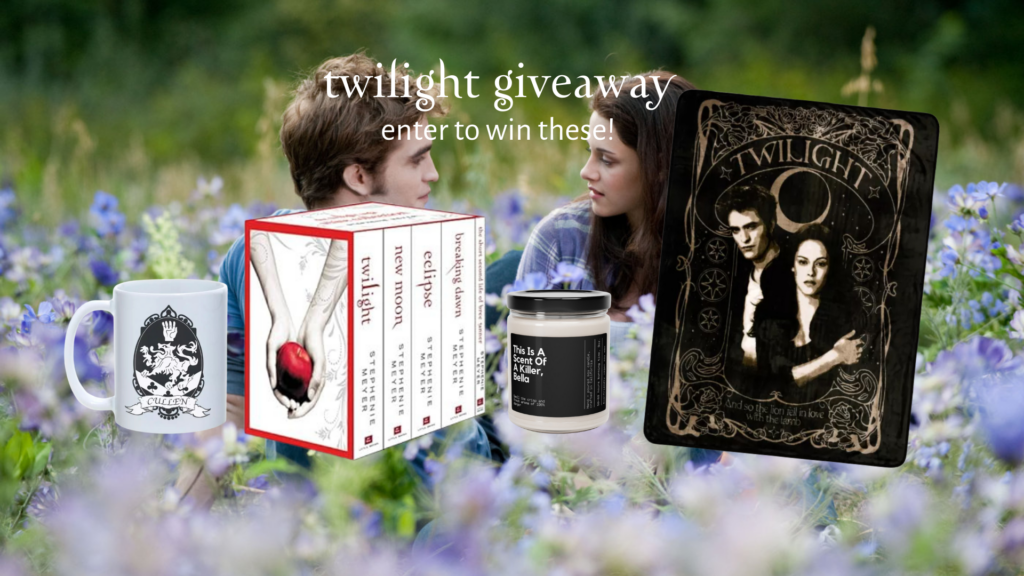
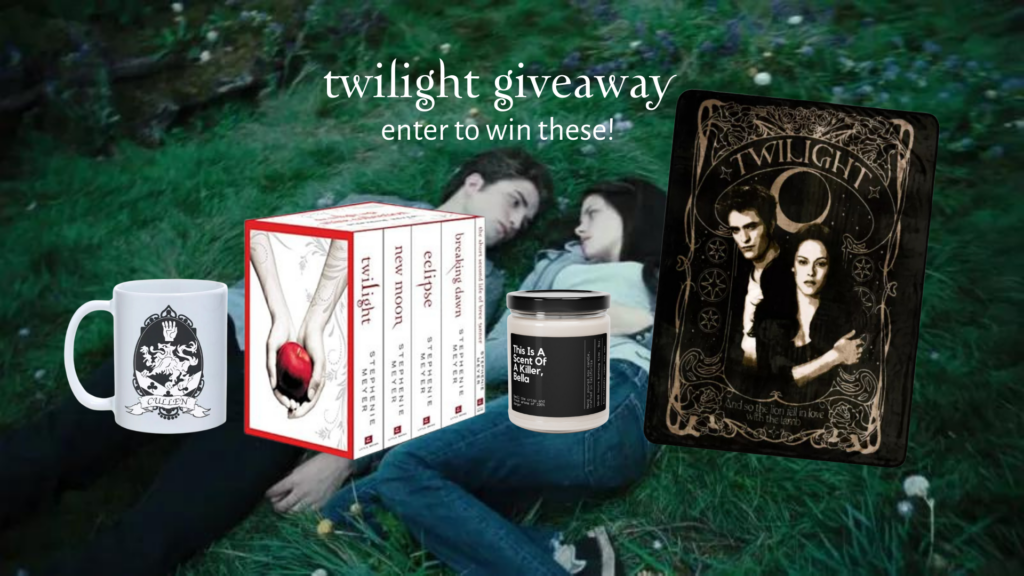
You’ll need to create an image or two of the prizes. These will appear at the top of the contest, similar to a Facebook cover photo. I created mine in Canva using 1920px x 1080px dimensions. Here’s what they looked like.
Bonus Entries
After they’ve entered, bonus entries are a way for participants to engage with you and gain additional entries. These activities are great at getting more eyes on your website and more follows on your social channels. You can assign how many entries they get per action.
You don’t want to overwhelm the participants with extra steps, so be thoughtful with what you ask of them. What social channels are you trying to grow your audience on? Do you have a Facebook page you’re trying to grow? A podcast you want them to tune into? Try and stick to 4-5 critical platforms.
Giveaway Rules
This is the section where I reiterated the rules, outlined exactly what entering the contest meant and what I would do with their emails, and clearly stated the sweepstakes is not sponsored, endorsed, or administered by any of the brands.
KingSumo has default rules you can use. If you opted to upgrade, you can use these, write your own, or a combo of the two. Remember this post is here as a guide to help you build a viral giveaway, but you are responsible for your own business decisions. Please check your state and local regulations for any rules or terms you need to incorporate.
Creating The Landing Page
If you have an author website, I highly recommend creating a landing page for your contest so it’s housed under your domain. To do this, you’ll need to embed the giveaway onto your site. Once you’ve created your contest, you’ll have the option to promote it on your dashboard. Select “Embed the giveaway widget on your website” from the options. You’ll then be provided the code.
Since the KingSumo form isn’t very aesthetic, this gives you an opportunity to fuse your brand into the contest and play up the theme of it even more.
Background
One way to incorporate the theme of your contest is to pick a cool background. It can be the standard color of your website or an image/video you own or one that is available via a stock website or under a creative common’s license.
To make my Twilight contest page more dynamic, I used a looping video of Bella riding on Edward’s back through the forest (spider-monkey style). Unfortunately, the giveaway was built on my old site so I can’t link it, but here is a screenshot.
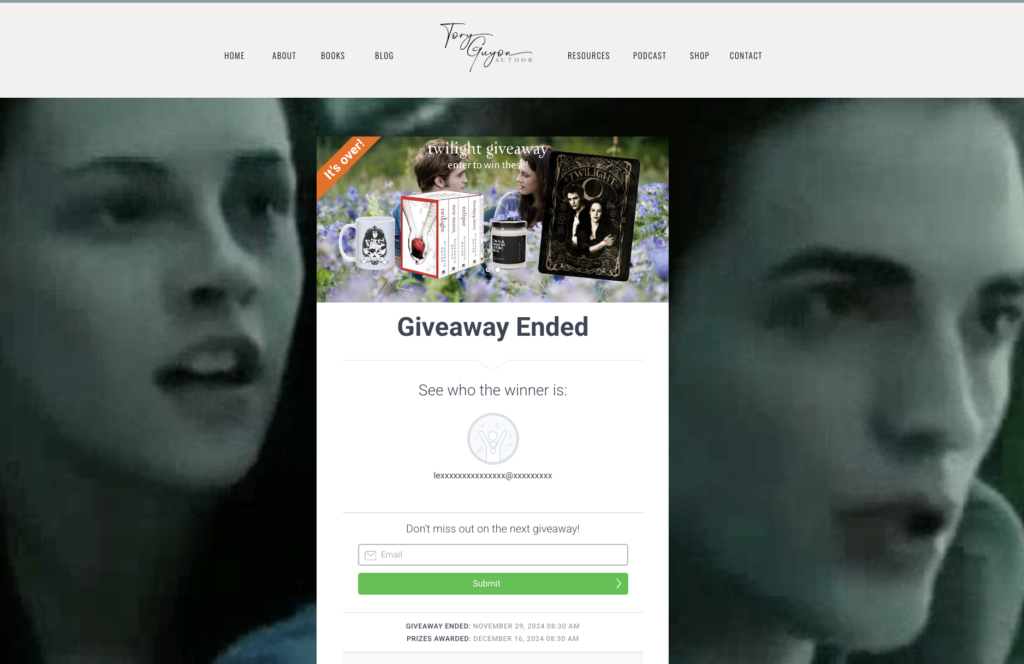
Hey Bella. Hey Edward.
URL
If you create a landing page, you’ll also be able to personalize the URL. This helps your contest feel more authentic and builds trust with potential contestants. KingSumo, while legit, isn’t a platform most people know. In a viral giveaway, authenticity and trust are important because entrants are exchanging a piece of personal information (emails) and will not do so if anything feels fishy.
A URL attached to your domain gets participants to see more of you, the human behind the contest.
A KingSumo URL will look something like this: https://kingsumo.com/g/1v94vym/twilight-giveaway
A URL attached to your domain will look something like this: saltandstarspress.com/twilight-giveaway
Promote Your Giveaway
As a creative who wants to spend all their time writing and world building, marketing is never fun. But it’s a necessary step to get your work out there. If you want people to read your book, you have to promote it. And if you want people to enter your contest, you’re going to have to promote it.
The goal is to get more people to enter your giveaway. Remember, more contestants = more eyes on your book, more visibility into your brand, more readers in your orbit.
There are two types of campaigns to market a product and service: free and paid.
Free Ad Campaigns
Free ad campaigns are marketing strategies that are zero-cost in terms of dollars but require chunks of your time. For some people, that’s not a problem. Others who want more of a hands-off approach might find paid ad campaigns a better investment.
Social Media
Social media campaigns require consistency in order to perform. This means developing a routine where you are posting often. One TikTok about your contest isn’t going to move the needle and increase the number of entrants.
This is a separate conversation, but all authors should be active on at least 1-2 platforms. This could be Instagram + your newsletter, TikTok + Facebook, etc. etc. Generally, wherever your readers are is where you should be. Put the link to the contest in your bio, share it on your stories, and use the giveaway as your main call to action (CTA) while it’s running.
Not every post should be centered around the contest, but every post should have it woven in. Whether it’s a line in the caption, using keywords that highlight the theme, or creating content that aligns with the genre and fandom to get more eyeballs on your account.
Facebook Groups
Facebook is an ecosystem of community. Click on the “groups” tab and type your genre in the search bar. I.E. indie romantasy books or fantasy books. Join ones that are relevant, check the group rules, and make sure to ask the admins before posting about your contest.
Website Pop-Ups
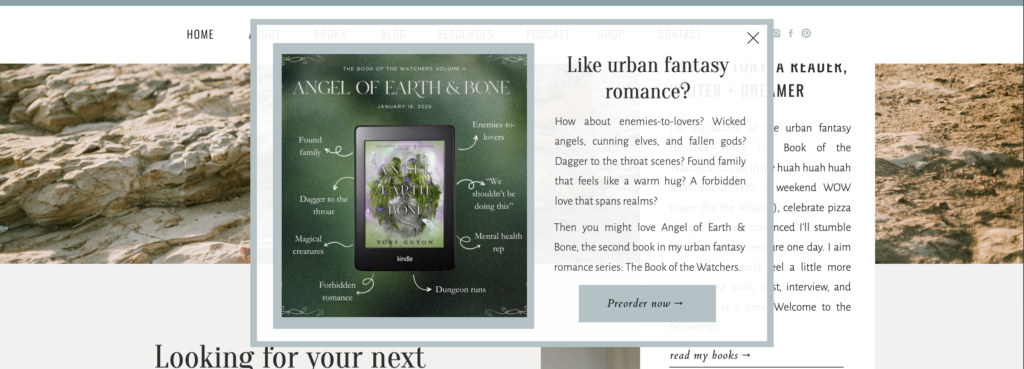
One low effort option is creating a website pop-up that highlights your contest. That way, anyone who visits your site will get a direct notification on their screen where they can choose to enter or click the X and keep scrolling. I unfortunately don’t have an example with Edward Cullen but here’s what it looks like just with a preorder campaign instead of a viral giveaway:
Paid Ad Campaigns
You want your giveaway to reach as many people as possible. With social media, there are known limits for reach and it can be a time suck trying to boost your engagement. If you don’t have—or don’t want to dedicate—a lot of time on the promotional aspect of your contest, and if your budget allows, I definitely suggest creating 1-2 paid ad campaigns.
While there’s a bit of upfront work (i.e. designing the creative, administrative work, determining target audience, managing spend, etc.) once an ad is locked it’s hands off (unless you want to make tweaks).
I won’t go into the technicalities of how to create a Facebook ad because that is a post in and of itself and a field I am not an expert in. Luckily, I can direct you to someone who is: David Gaughran.
His Facebook Ad Tutorial on YouTube single handedly helped me create, strategize, and publish on the Meta Ads Platform, which is so effing complicated I don’t think I ever would have been able to attempt it without him (so, if you ever see this David, thank you!).
I ran my Twilight ad over a six week period. Here are the results:
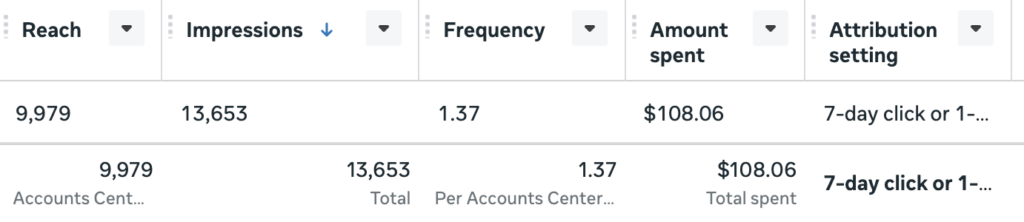
That’s a lot of eyes, right!? Out of the ~10,000 people who saw the ad, here is how many people clicked:

A 13.5% clickthrough rate is exceptionally high. This is absolutely due to my targeting (fans of Twilight / paranormal romance / Edward Cullen). What’s that saying? If you’re selling to everyone, you’re selling to no one. The more niche you can get, the better.
Luckily, Pinterest is a lot more straightforward when it comes to paid campaigns. In order to run ads, you must have a business account. Here are detailed instructions on how to do that. Note business accounts are public accounts, so you cannot have a private profile (you can still have private boards, though!).
Once you’re logged into your business account, follow these steps to create your first ad:
- Click the Pinterest icon in the top left corner.
- Under the Manage Campaigns section, select Create Campaign.
- Choose “Consideration” as your main objective.
- Either select or upload a new pin. Pinterest will auto-select around 5, but you don’t have to use that many! Press the gray X on the bottom row of suggested pins to remove any you don’t want to use. Remember, Pinterest reads images, so make sure the file names include keywords.
- Confirm the ad name and destination URL. Make sure you’re using SEO and that the URL directs to your contest page, not your website.
- Review the campaign summary and adjust as needed. NOTE: Age restrictions, location targeting, campaign budget and duration are autofilled based on campaigns of similar size and objectives. Pinterest typically does a decent job at targeting based on your niche, but you’ll definitely want to evaluate your spend per day and how long you want the ad to run based on that number.
When the Giveaway Ends
Once your giveaway ends KingSumo will award the winner at random for you. Then it’s up to you to reach out to them and send them their prize. As for all your new subscribers, I recommended sending them a curated welcome email reminding them who you are and why they’re there. This is your first interaction outside the contest with them, and you want them to stick around! Here’s a few ways to make them feel special and thank them for participating in your giveaway:
- Invite them to apply for an ARC of your latest release
- Share an exclusive piece of character art
- Include a freebie like a short story
- Host a mini giveaway of your book
I hope you enjoyed this blog post about KingSumo giveaways for author marketing! If you want to learn more about how Pinterest can help you reach more readers, check out this blog post!